

Appearance
User Guide for Commission Overview
Commission Overview – Shopify Multivendor Marketplace App
Multivendor Marketplace for Shopify offers a robust commission management system, allowing store owners to earn from every sale made by their sellers.
In a marketplace model, commissions are the core of the revenue structure for the admin. They represent the amount earned by the marketplace owner from each transaction made by vendors.
What is a Commission?
A commission is the percentage or fixed fee that the admin (store owner) earns from a seller's product sale. It can be configured in multiple ways based on your business model:
- Global Commission
- Seller-wise Commission
- Product-wise Commission
- Category/Collection-wise Commission
- Variant-wise Commission
Example:
If Seller X lists Product A for $100 and the admin sets a 10% commission, then:
- Admin earns $10
- Seller receives $90
The app follows this commission priority hierarchy:Global Commission < Seller-wise < Category-wise < Product-wise
Global Commission
- Applied to all sellers, products, and collections.
- Set from the Global Commission Settings tab in the app.
- Supports both percentage-based and fixed-value commission.
Example:
If commission is set to 10% + $20, and the total order is $1400:
- Seller A’s sale: $500 → Admin gets $70 → Seller earns $430
- Seller B’s sale: $900 → Admin gets $110 → Seller earns $790
Seller-wise Commission
You can override the global settings for specific sellers from the Seller Commission Settings page in the app.

Product-wise Commission
Enable product-wise commission from the app’s configuration settings.
Navigate to Products > Product Listing > Edit Product and set the desired commission.
Note: Disable “Display Sales Price on Products” from the configuration to use this.
Category (Collection)-wise Commission
To enable this:
- Activate “Restrict Collection” from the configuration.
- Go to Products > Collections and click Sync.
- Set the commission via the Collection Commission Settings page.
Variant-wise Commission
Commission can be applied at the variant level by navigating to: Products > Product Listing > Edit Product > Edit Variant
Set the commission on individual variants as needed.
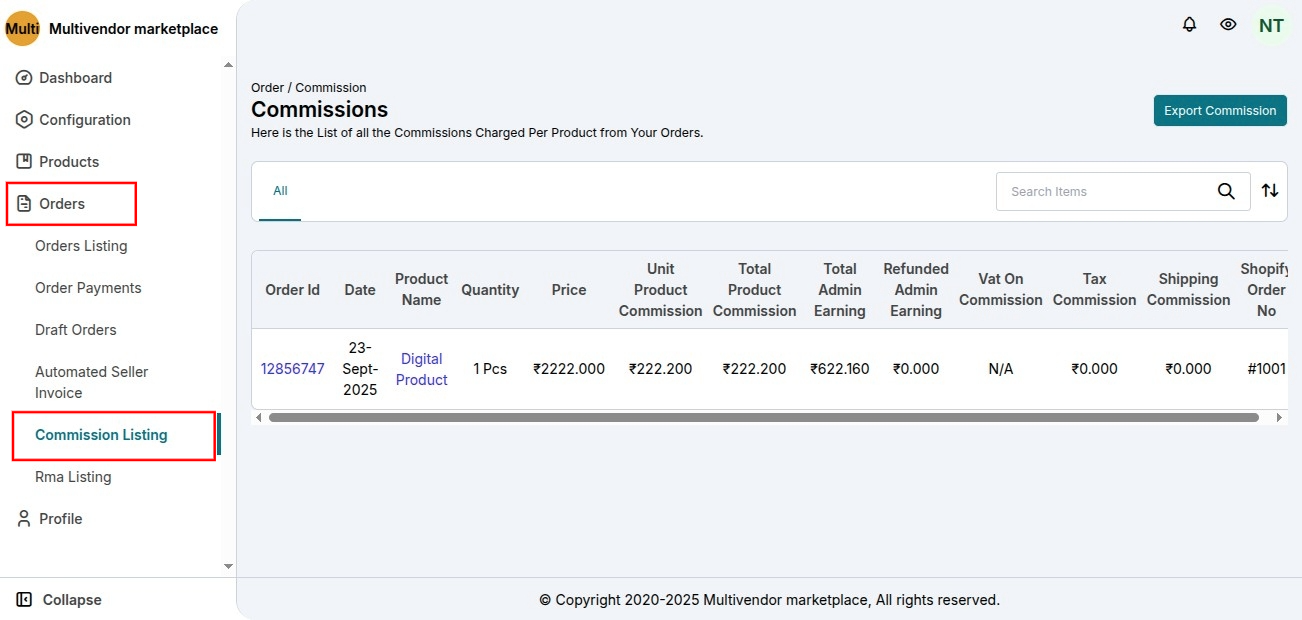
Seller Panel – Commission Listing
Sellers can view commissions for each order from:
Seller Panel > Orders > Commission Listing
Monthly Sales-Based Commission (Slab-Wise Commission)
The Monthly Sales-Based Commission feature allows the admin to configure a dynamic commission structure where the commission percentage automatically changes based on the seller’s total sales within a defined monthly cycle.
This commission structure is applied globally to all sellers and resets automatically at the end of each monthly cycle.
1. Enable Slab-Wise Commission
- Go to Admin Panel → Commission → Global Commission Settings.
- Locate the Commission Type section.
- Select the option “Sales/Slab-Wise Commission”.
- Click Save.

Once enabled, the admin can define commission slabs based on monthly total sales.
2. Define Commission Slabs
The admin can define up to 10 commission rules (slabs).
For each slab, configure the following:
- Minimum Sales Amount
- Maximum Sales Amount
- Commission Percentage

Example Commission Structure
| Total Monthly Sales (USD) | Commission (%) |
|---|---|
| 0 – 1,000 | 30% |
| 1,001 – 2,000 | 20% |
| Above 2,000 | 10% |
Click Add More Range to create additional rules (maximum 10 slabs).
Save the configuration after defining all slabs.
How Commission Is Calculated
During the defined monthly cycle, the commission is calculated based on the seller’s total accumulated sales for that month at the time of each order.
Example Scenario
First Order: USD 500
- Total Sales = USD 500
- Commission Applied = 30%
Second Order: USD 600
- Total Sales = USD 1,100
- Commission Applied = 20%
Third Order: USD 500
- Total Sales = USD 1,600
- Commission Applied = 20%
Once total sales exceed USD 2,000, the commission will automatically change to 10% for subsequent orders.
This process continues until the monthly cycle ends, after which the calculation resets automatically.
Seller Panel Visibility
Sellers can view the following details:
- Commission deducted per order
- Total commission deducted
- Order-wise commission details
This information is available in:
Seller Panel → Orders → Commission Listing
As the seller’s total earnings increase during the cycle, the commission percentage will automatically adjust according to the defined slab structure.
Important Notes
- A maximum of 10 commission slabs can be configured.
- The commission structure is applied globally to all sellers.
- It is not possible to define separate slab structures for individual sellers.
- The commission cycle automatically resets after the defined period.
This feature enables marketplace owners to incentivize higher seller performance by offering reduced commission rates as sales volume increases.
Learn More
Read the full guide on Commission Types
Demo
Explore a live demo of the Multivendor Marketplace:
https://egsma.io/shopify-multivendor-marketplace/